
Tipps für die LinzMobil-App
Kennen Sie schon alle Funktionen und Services in der LinzMobil App? Mit diesen praktischen Tipps wird Ihre tägliche Mobilität noch komfortabler.

Schon probiert? Wenn Sie auf Ihrem iPhone am Homescreen lange auf das orangefarbene Icon der LinzMobil App tippen, erscheint das so genannte "Quick Actions"-Menü. Von dort aus können Sie beispielsweise direkt zu den aktuellen News wechseln, die Verkehrsmeldungen aufrufen oder eine Route nach Hause planen.
Information in English
Have you tried yet? If you press the orange LinzMobil app icon for a longer time on your iPhone home screen, the so called ‘quick actions’ menu appears. With this, you can for example switch directly to the recent news or plan your trip home.
Verpassen Sie dank des Menüpunkts ‚News‘ keine Neuigkeiten mehr rund um die LinzMobil-App. Wenn Sie Push-Benachrichtigungen mit den aktuellen Infos erhalten möchten, aktivieren Sie dazu bitte in den Geräteeinstellungen die Benachrichtigungen bzw. Mitteilungen wie folgt:
- Android: Einstellungen > Apps > LinzMobil > Berechtigungen > Benachrichtigungen
- iOS: Einstellungen > Mitteilungen > LinzMobil > Mitteilungen erlauben
Information in English
Do not miss any news related to LinzMobil thanks to the ‘news’ feature. If you want to receive push notifications regarding the current information, please activate the notifications in the settings of your device:
- Android: Settings > Apps > LinzMobil > Permissions > Notifications > Allow notifications
- iOS: Settings > Notifications > LinzMobil > Allow notifications
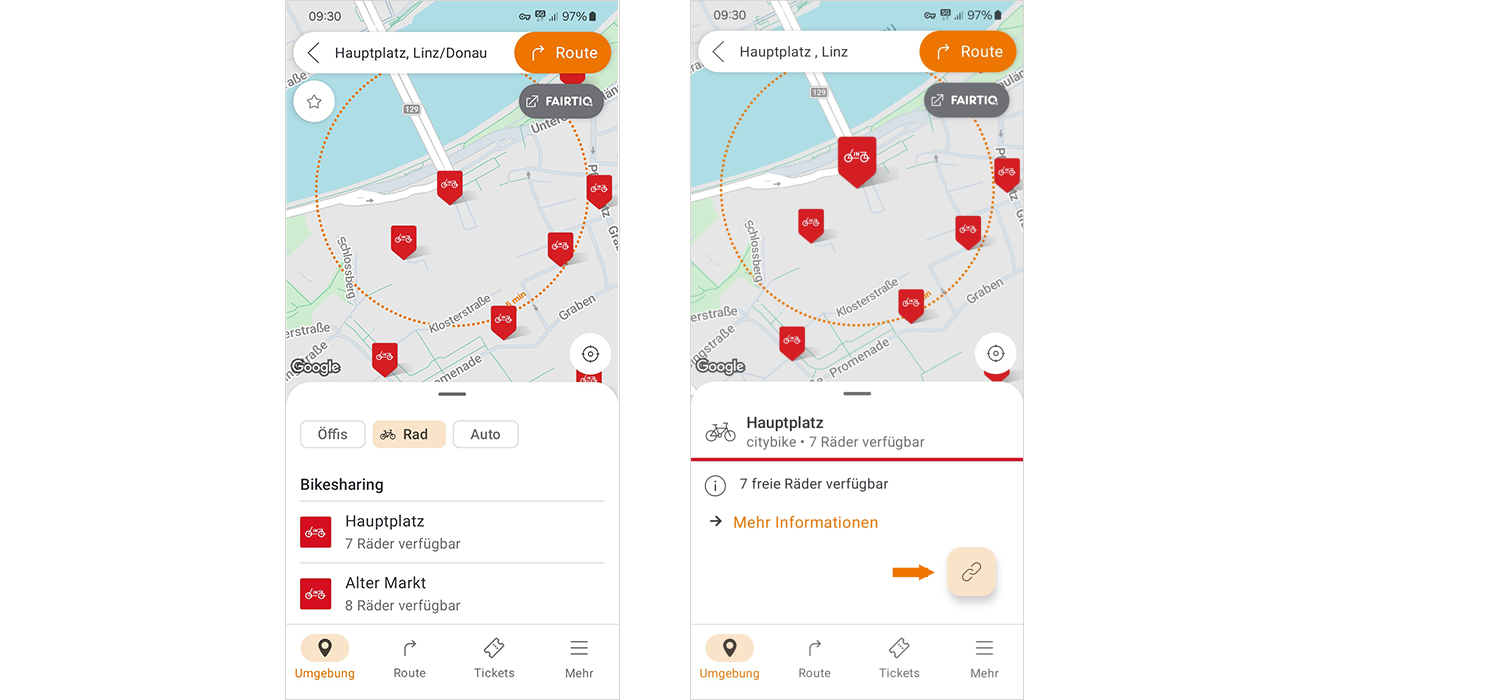
In der Umgebungskarte können Sie in den Fahrrad-Tab wechseln, wo Sie dann die city bike Linz-Standorte auf der Karte angezeigt bekommen.
Beim jeweiligen Standort sehen Sie die Anzahl der verfügbaren Räder. Über eine Verlinkung können Sie vom Standort über das Symbol direkt in die nextbike-App wechseln, um dort das Fahrrad zu buchen.
Information in English
In the Explore section you can switch to the bike tab, where you can see the city bike Linz locations on the map.
For the respective station, you can see the number of available bikes. Via the link icon in the location detail you will be forwarded directly to the nextbike app, where you can book the bike.
Erhalten Sie regelmäßig exklusive Neuigkeiten und Aktionen per Mail!